
Skip to content
WP Supporto
  • Best sellers

    Cart Stock Reservation TimerHold stock with a countdownCOD Verification and Fake Order BlockerVerify buyers, stop fake ordersGPSR ComplianceSafety info on product pagesEdit OrderCustomers fix their own orders

    Categories

    Checkout (3 plugins)Fake orders, lost carts, delivery guaranteeOrders (5 plugins)Edit, split, approve and return ordersCompliance (3 plugins)GPSR, product passports and e-invoicesGrowth (10 plugins)Samples, videos, group deals and more

    Try before you buy

    Free version and a live demo of every plugin

    Click through a real demo store, then install the free version. Pro adds updates, docs and priority support.

    See all 21 plugins
  • Open a ticketReach the developers who built itDocumentation312 guides with screenshotsContact usWhatsApp, Telegram, email or Slack

    A developer replies, not a bot.

  • Docs
  • Blog
Sign inBrowse plugins
Sign in Browse plugins
Multi Location Inventory and Stock
  1. What the plugin does
  2. How the numbers stay correct
  3. First setup
  4. Locations
  5. Entering stock
  6. The stock overview
  7. How an order finds its location
  8. Orders, emails and the packing slip
  9. What shoppers see
  10. Stock log and repair tools
  11. All free settings
  12. REST API and WP-CLI
  13. Pro: shopper location picker
  14. Pro: click and collect
  15. Pro: nearest location
  16. Pro: stock transfers
  17. Pro: low stock alerts
  18. Pro: CSV import and export
  19. Pro: location managers
  20. Pro: hide and limit by location
  21. Pro: multi location orders
  22. Pro: reports
  23. Pro: stock count mode
  24. Pro: location email
  25. Free and Pro compared
  26. Questions and limits
Plugin page and pricingStill stuck? Open a ticket

Docs / Multi Location Inventory and Stock

Pro: stock count mode

Made for a phone or tablet. Choose a location, scan or search, enter what you counted and see the difference. Apply it in one step. Rows left empty are not touched. Units sold during the count stay counted as sold, because the difference to what the screen showed is what gets applied.
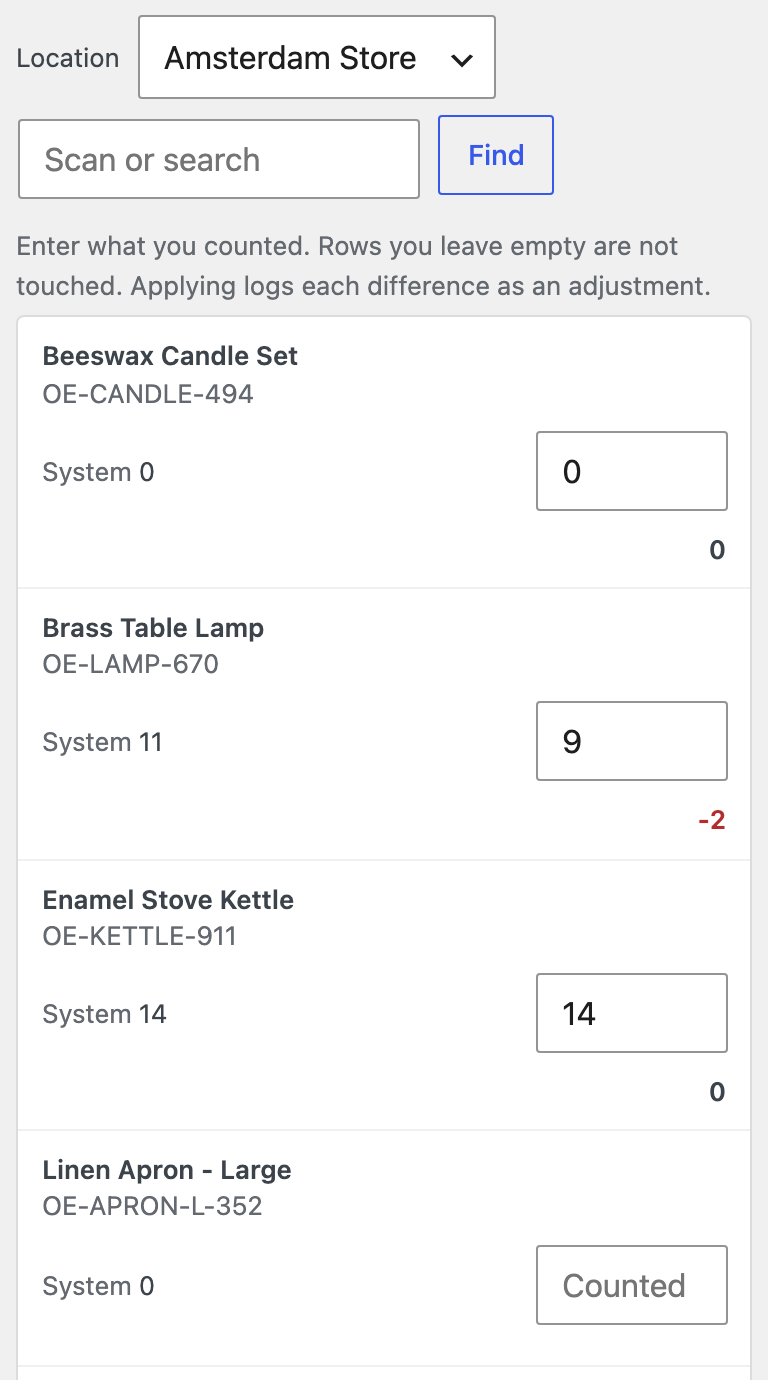
Stock count on a phone.
PreviousPro: reportsNextPro: location email
WP Supporto

WooCommerce plugins with a free version, a live demo and support from the developers who built them.

Browse plugins

Products

  • All plugins
  • Live demos
  • Docs
  • Changelog

Help

  • Open a ticket
  • Documentation
  • Contact us
  • Suggest a plugin

Company

  • Blog
  • Privacy policy
  • Terms
  • Refund policy

Copyright 2026 WP Supporto. All rights reserved.

Free version of every plugin · 30 day money back

We use cookies to measure visits and improve our ads. Analytics and ad cookies are only set if you accept. Privacy policy